

General Guidelines
Resolution
All images used in your art file should be at least 300dpi (dots per inch). Images with a resolution lower than 300dpi may cause the image to look blurry or pixilated. Images taken from the internet are typically at a resolution of 72dpi. This works well to display on your computer monitor, but this resolution is too low to produce a quality printed piece. There are exceptions to this, such as if your image came from a stock image site or something similar. Please feel free to contact us if you have any questions on your image. See images below.
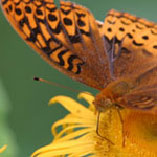
High Resolution (300dpi)

72dpi / internet image
Bleed
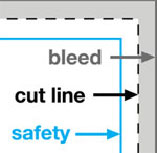
All art files need to have .125"/3mm bleed on all sides. Your submitted file should be .25"/ 6mm larger than the product size that you are purchasing (i.e. 4"x6" postcard would require a 4.25" x 6.25" art file). See diagram below.
Safe Area
Any images or text critical to your design should not extend past the safe area, which is .125"/3mm inside the cut line to avoid being cut off when the finished piece is trimmed. See diagram below.
Full Color
Art files that are submitted should be saved in CMYK to help ensure color accuracy. Any files submitted as RGB or PMS colors will be converted to CMYK and there may be some color shifts due to variances in the color modes (illu- strated in the images below). Please see our glossary for definitions of CMYK, RGB and PMS.

CMYK image

RGB image
Fonts
Fonts, transparencies and other effects used in vector format softwares (Illustrator and InDesign) must be fla- ttened and the fonts outlined. Not flattening transparencies or outlining fonts may result in some text or graphics dropp- ing out from your artwork.
Caution
Screen colours are never accurate; please check your CMYK or Pantone (PMS) specifications. Any files received in any other colour format (i.e.: RGB, Lab, HSB) will still be printed and may not reproduce as your expectations; Printedinchinaonline.com will not be responsible for any colour variations/errors.